
zshは究極のシェルなどと呼ばれる、高性能なシェルです。
例えば、このようなかなり便利な機能があります。
- タイプミスの訂正

ここでは、「chmod」と打つべきところを「chommd」とタイプミスしています。
しかしzshは、「chmodの間違いですよね?」と聞いています。
このように、タイプミスをしても訂正する機能があります。
- 入力補完機能


まず、コマンドを途中まで入力して、Tabキーを押します。
すると、この画像のように補完候補が表示されます。
それをカーソルキーで選択してEnterキーを押すとこのように補完されます。

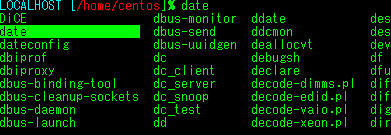
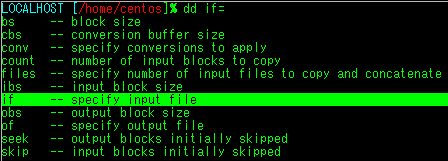
このように複数のファイルやコマンド等を補完することもできます。
この他にも、たくさんの便利な機能があります。
参考にしたWebページ…
漢のzsh | コラム | エンタープライズ | マイコミジャーナル
zshのある暮らし2
その他googleで出てきたページ

以下、kuriuzuが使っている.zshrcの内容です。
# users generic .zshrc file for zsh(1)

## Environment variable configuration
#
# LANG
#
export LANG=ja_JP.UTF-8
case ${UID} in
0)
    LANG=C
    ;;
esac

## Default shell configuration
#
# set prompt
#
autoload colors
colors
case ${UID} in
0)
    PROMPT="%{${fg[cyan]}%}[$(echo ${HOST%%.*} | tr '[a-z]' '[A-Z]') %B%{${fg[yellow]}%}%{${bg[red]}%}%/]%{${reset_color}%}%{${reset_color}%}%{${fg[red]}%} %{${bg[yellow]}%}%b%B#%{${reset_color}%}%{${reset_color}%}%b "
    PROMPT2="%B%{${fg[red]}%}%_#%{${reset_color}%}%b "
    SPROMPT="%B%{${fg[red]}%}%SERROR!%s %B%r%b is correct? [No/Yes/Abort/Exit]:%{${reset_color}%}%b "
    RPROMPT="%S%B%{${fg[yellow]}%}%{${bg[red]}%}[%n]%s%b%{${reset_color}%}%{${reset_color}%}[%BRUN LEVEL:$(who -r|awk '{print $2}')%b][%B%T%b]"
    ;;
*)
    PROMPT="[%{${fg[red]}%}%/%{${reset_color}%}]%B%%%b "
    PROMPT2="%{${fg[red]}%}%_%%%{${reset_color}%} "
    SPROMPT="%{${fg[red]}%}%SERROR!%s %B%r%b is correct? [No/Yes/Abort/Exit]:%{${reset_color}%} "
    [ -n "${REMOTEHOST}${SSH_CONNECTION}" ] &&
        PROMPT="%{${fg[cyan]}%}$(echo ${HOST%%.*} | tr '[a-z]' '[A-Z]') ${PROMPT}"
	RPROMPT="%{${bg[blue]}%}%{${fg[cyan]}%}%B[%n]%b%{${reset_color}%}%{${reset_color}%}[%BRUN LEVEL:$(who -r|awk '{print $2}')%b][%B%T%b]"
    ;;
esac

# auto change directory
#
setopt auto_cd

# auto directory pushd that you can get dirs list by cd -[tab]
#
setopt auto_pushd

# command correct edition before each completion attempt
#
setopt correct

# compacked complete list display
#
setopt list_packed

# no remove postfix slash of command line
#
setopt noautoremoveslash

# no beep sound when complete list displayed
#
setopt nolistbeep

## Keybind configuration
#
# emacs like keybind (e.x. Ctrl-a gets to line head and Ctrl-e gets
#   to end) and something additions
#
bindkey -e
bindkey "^[[1~" beginning-of-line # Home gets to line head
bindkey "^[[4~" end-of-line # End gets to line end
bindkey "^[[3~" delete-char # Del

# historical backward/forward search with linehead string binded to ^P/^N
#
autoload history-search-end
zle -N history-beginning-search-backward-end history-search-end
zle -N history-beginning-search-forward-end history-search-end
bindkey "^p" history-beginning-search-backward-end
bindkey "^n" history-beginning-search-forward-end
bindkey "\\ep" history-beginning-search-backward-end
bindkey "\\en" history-beginning-search-forward-end

# reverse menu completion binded to Shift-Tab
#
bindkey "\e[Z" reverse-menu-complete

## Command history configuration
#
HISTFILE=${HOME}/.zsh_history
HISTSIZE=50000
SAVEHIST=50000
setopt hist_ignore_dups     # ignore duplication command history list
setopt share_history        # share command history data

## Completion configuration
#
fpath=(${HOME}/.zsh/functions/Completion ${fpath})
autoload -U compinit
compinit

## zsh editor
#
autoload zed

## Prediction configuration
#
autoload predict-on
#predict-off
zle -N predict-on
zle -N predict-off
bindkey '^xp' predict-on
bindkey '^x^p' predict-off

## Large small
#
zstyle ':completion:*' matcher-list 'm:{a-z}={A-Z}'

##↑Allow Key completion
#
zstyle ':completion:*:default' menu select true

## Alias configuration
#
# expand aliases before completing
#
setopt complete_aliases     # aliased ls needs if file/dir completions work

alias where="command -v"
alias j="jobs -l"

case "${OSTYPE}" in
freebsd*|darwin*)
    alias ls="ls -G -w"
    ;;
linux*)
    alias ls="ls --color"
    ;;
esac

alias la="ls -a"
alias lf="ls -F"
alias ll="ls -l"

alias du="du -h"
alias df="df -h"

alias su="su -l"

## terminal configuration
#
case "${TERM}" in
screen)
    TERM=xterm
    ;;
esac

case "${TERM}" in
xterm|xterm-color)
    export LSCOLORS=exfxcxdxbxegedabagacad
    export LS_COLORS='di=34:ln=35:so=32:pi=33:ex=31:bd=46;34:cd=43;34:su=41;30:sg=46;30:tw=42;30:ow=43;30'
    zstyle ':completion:*' list-colors 'di=34' 'ln=35' 'so=32' 'ex=31' 'bd=46;34' 'cd=43;34'
    ;;
kterm-color)
    stty erase '^H'
    export LSCOLORS=exfxcxdxbxegedabagacad
    export LS_COLORS='di=34:ln=35:so=32:pi=33:ex=31:bd=46;34:cd=43;34:su=41;30:sg=46;30:tw=42;30:ow=43;30'
    zstyle ':completion:*' list-colors 'di=34' 'ln=35' 'so=32' 'ex=31' 'bd=46;34' 'cd=43;34'
    ;;
kterm)
    stty erase '^H'
    ;;
cons25)
    unset LANG
    export LSCOLORS=ExFxCxdxBxegedabagacad
    export LS_COLORS='di=01;34:ln=01;35:so=01;32:ex=01;31:bd=46;34:cd=43;34:su=41;30:sg=46;30:tw=42;30:ow=43;30'
    zstyle ':completion:*' list-colors 'di=;34;1' 'ln=;35;1' 'so=;32;1' 'ex=31;1' 'bd=46;34' 'cd=43;34'
    ;;
jfbterm-color)
    export LSCOLORS=gxFxCxdxBxegedabagacad
    export LS_COLORS='di=01;36:ln=01;35:so=01;32:ex=01;31:bd=46;34:cd=43;34:su=41;30:sg=46;30:tw=42;30:ow=43;30'
    zstyle ':completion:*' list-colors 'di=;36;1' 'ln=;35;1' 'so=;32;1' 'ex=31;1' 'bd=46;34' 'cd=43;34'
    ;;
esac

# set terminal title including current directory
#
case "${TERM}" in
xterm|xterm-color|kterm|kterm-color)
    precmd() {
        echo -ne "33]0;${USER}@${HOST%%.*}:${PWD}07"
    }
    ;;
esac

## load user .zshrc configuration file
#
[ -f ${HOME}/.zshrc.mine ] && source ${HOME}/.zshrc.mine